**UPDATE 1: It appears current versions of Skype (e.g. ver.8.12.0.14) broke the capability to run multiple instances of Skype (via command line) on a Mac. I’m looking into a fix. You can use Source-Connect Now as a high quality Skype alternative. Two accounts will be necessary. Setup and Routing will be consistant with what is described in this documentation. Please contact me with questions …
**UPDATE 2: I solved the incompatability issue noted above by uninstalling Skype 8.xx for Mac and reverting back to Skype ver. 7.58 (501). Once again it is possible to run multiple instances of Skype (discrete accounts) on the host system by executing the terminal command noted in this documentation …
**UPDATE 3: It is now possible to run multiple instances of Skype 8.xx (discrete accounts) on the host system. I coded a Cocoa application capable of launching the discrete accounts. Contact me for details …
* * *
It is possible to record two (or more) independently connected Skype clients on discrete tracks on a single computer in RT. The workflow requires independent Mix-Minus feeds configured in a supported DAW such as Pro Tools or Logic Pro.
Plausible Session Senarios:
(Scenario A) Typical Podcast consisting of a Host + Skype Guest + Skype Guest. Dual Mix-Minus feeds are implemented in the Host’s DAW. All participants recorded on discrete tracks in RT utilizing two individual incoming Skype clients running simultaneously on the Host system.
(Scenario B) Engineer + Skype Session Participant + Skype Session Participant. Dual Mix Minus feeds are implemented in the Host’s DAW. Both participants recorded on discrete tracks utilizing two individual incoming Skype clients running simultaneously on the Host system.
Scenario B describes an engineering session providing support for independently located remote Skype participants who seek recording and post services. The workflow frees the participants from recording responsibilities and file management.
As noted both Scenarios require the use of two individual Skype clients running simultaneously on the Host/Engineer’s system. This concept is publicly documented using various methods.
What differentiates my workflow is the use of virtual routing within the Recording Session on a single machine. Dual Mix-Minus feeds are implemented in the Host’s DAW with zero dependency on hardware Aux Sends.
Loopback by Rogue Amoeba is used to create Virtual Devices and Pass-Thru’s. They will be encapsulated in an Aggregate Audio Device created in OSX. Additionally, my working Motu Audio Interface (8×8) will be added to the Aggregate Device for maximum flexibility.
Dual Mix-Minus
The intent of a single Mix-Minus feed is to send a Host’s audio back to a Session participant. This is commonly implemented on a hardware mixer or console using an Aux Send. It is nothing more than a discrete audio output with a level control.
When adding a second participant, the Host’s audio is routed to both participants using two Aux Sends (A), (B). The implemented Sends are also used to establish communication between the included participants.
For example:
Send (A) contains the Host + Participant 1 —-> signal is routed to Participant 2
Send (B) contains the Host + Participant 2 —-> signal is routed to Participant 1
Virtual Device Creation
The following I/O configuration is necessary for the described Host/Engineer + Skype 1 + Skype 2 scenario:
3 Mono Inputs: [Host] + [Skype Client 1] + [Skype Client 2]
2 Mono Outputs: [Host/Skype Client 1] + [Host/Skype Client 2]
Additional output routing will be necessary for monitoring and external recording. We will address this in a moment.
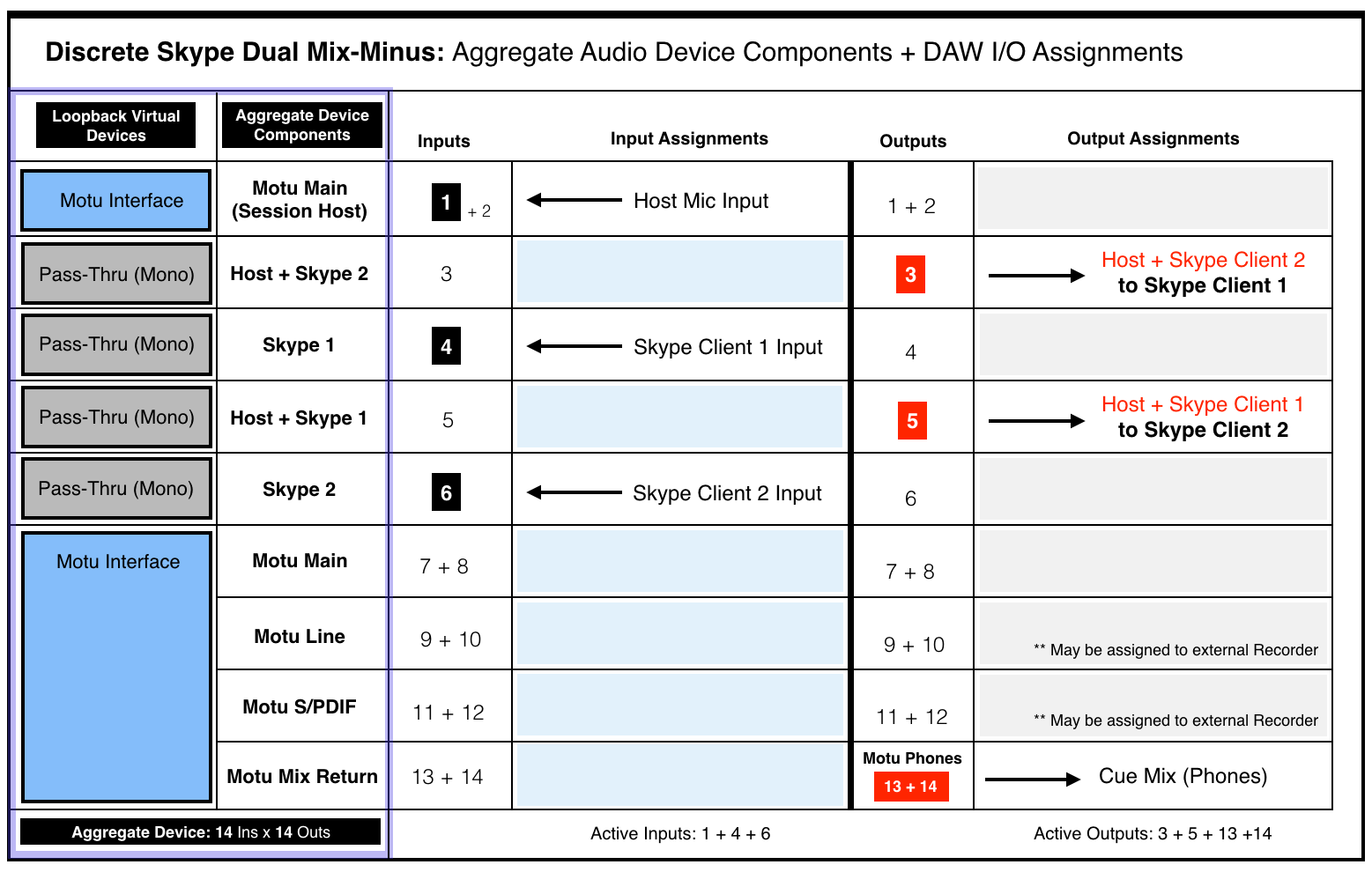
Please review the following I/O Matrix table:
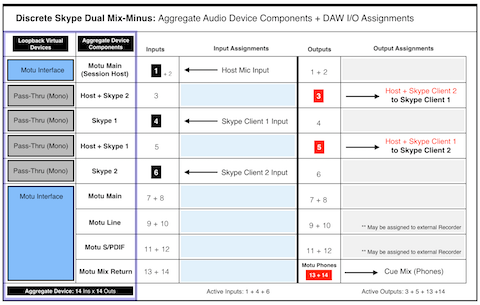
Column 1 lists six Virtual Devices created in Rogue Amoeba’s Loopback application. Column 2 lists their associated user defined names.
• An initial Motu Audio Interface instance is created with inputs/outputs 1+2 mapped for use. Input 1 will represent the Host Mic.
• Four individual (Mono) Pass-Thru Devices are created:
Input 4 will be mapped to Skype Client 1
Input 6 will be mapped to Skype Client 2
Output 3 will include [Host + Skype Client 2]
Output 5 will include [Host + Skype Client 1]
• A secondary Motu instance is created with all available inputs/outputs mapped for use (8×8 by default). This will supply additional routing flexibility for monitoring and external recording. In fact the I/O Matrix table displays the use of outputs 13+14 for the Cue Monitor Mix (Phones).
Note the Inputs and Outputs are purposely alternated to prevent direct patching and subsequent feedback.
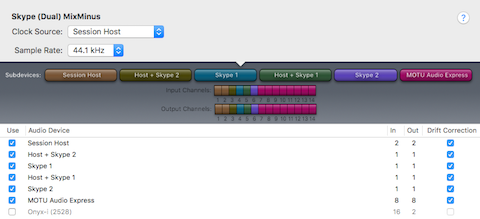
These user defined Loopback Virtual Devices will appear in the Mac OSX Audio MIDI Setup utility. They can be used individually. They can also be combined, thus creating a cumulative (Aggregate) Audio Device. We will utilize both options (individual Virtual Devices for Skype Clients + cumulative Aggregate as the DAW’s default I/O).
Aggregate Device
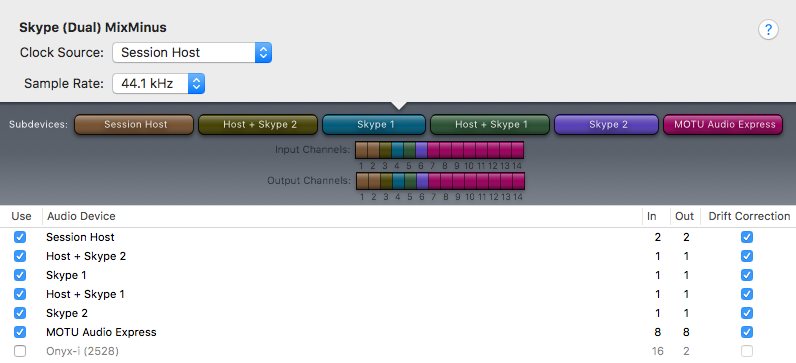
The image below displays a user defined Aggregate Audio Device created in OSX using the Audio MIDI Setup utility. It is named Skype (Dual) MixMinus. Notice how I’ve selected the Virtual Devices created in Loopback as Subdevices. Also notice how each Subdevice accurately displays input and output I/O mapping for a total of 14 inputs + 14 outputs. This matches the configuration displayed in the I/O Matrix table diagram above. The Aggregate Audio Device is now ready for DAW integration.
DAW Implementation
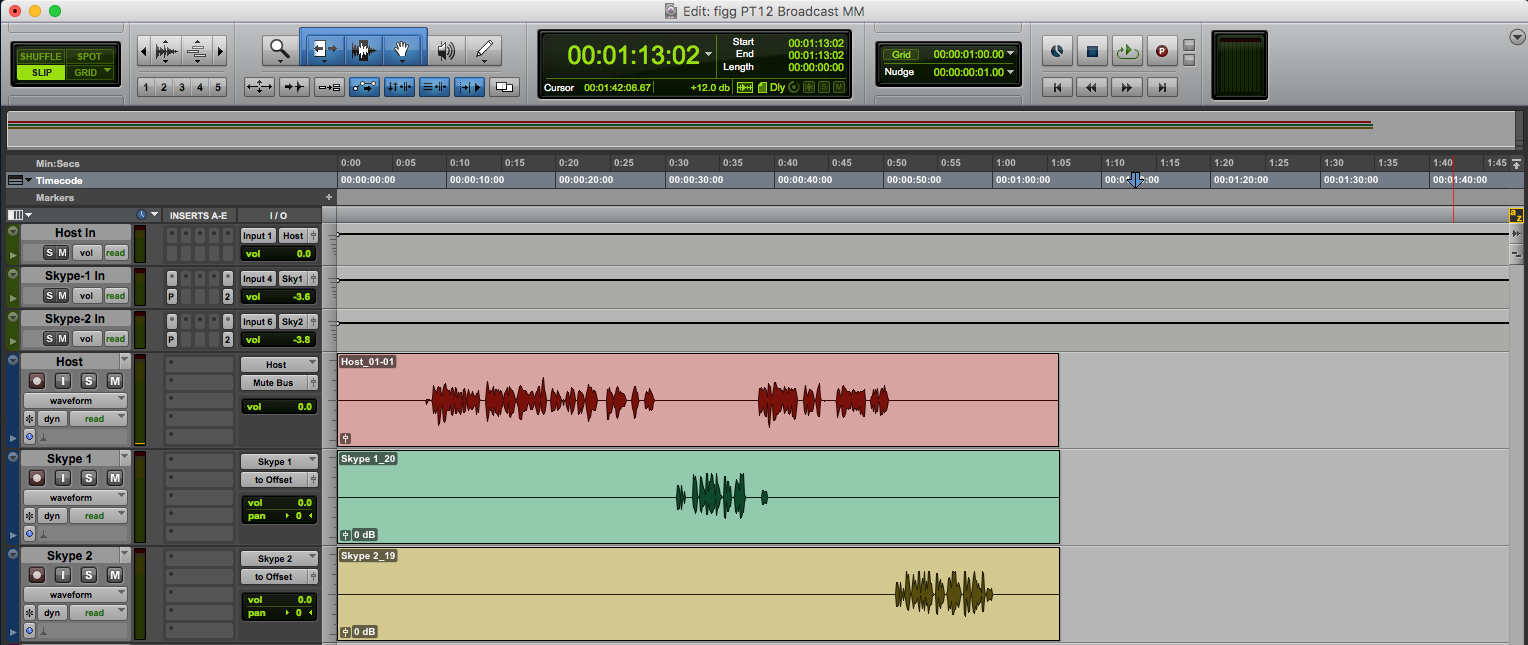
For this demonstration I will be using Pro Tools with the Skype (Dual) MixMinus Aggregate set as the Playback Engine (it’s default Session I/O). This configuration has also been successfully implemented in Logic Pro X. It has not been tested in Adobe Audition.
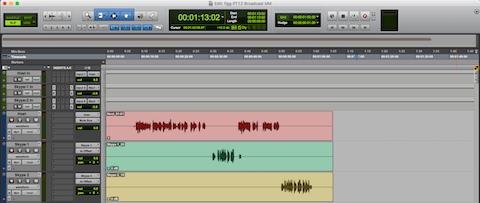
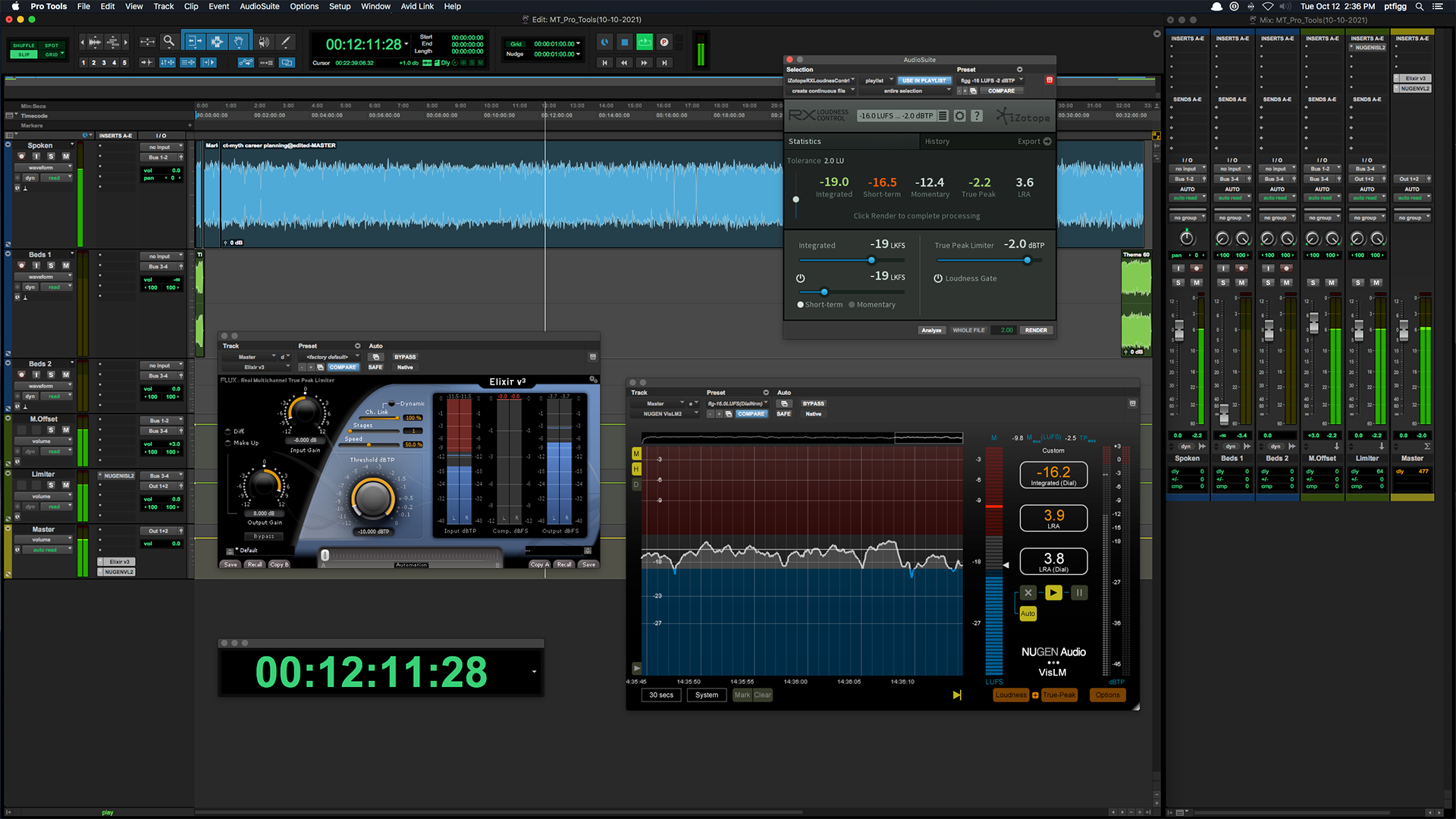
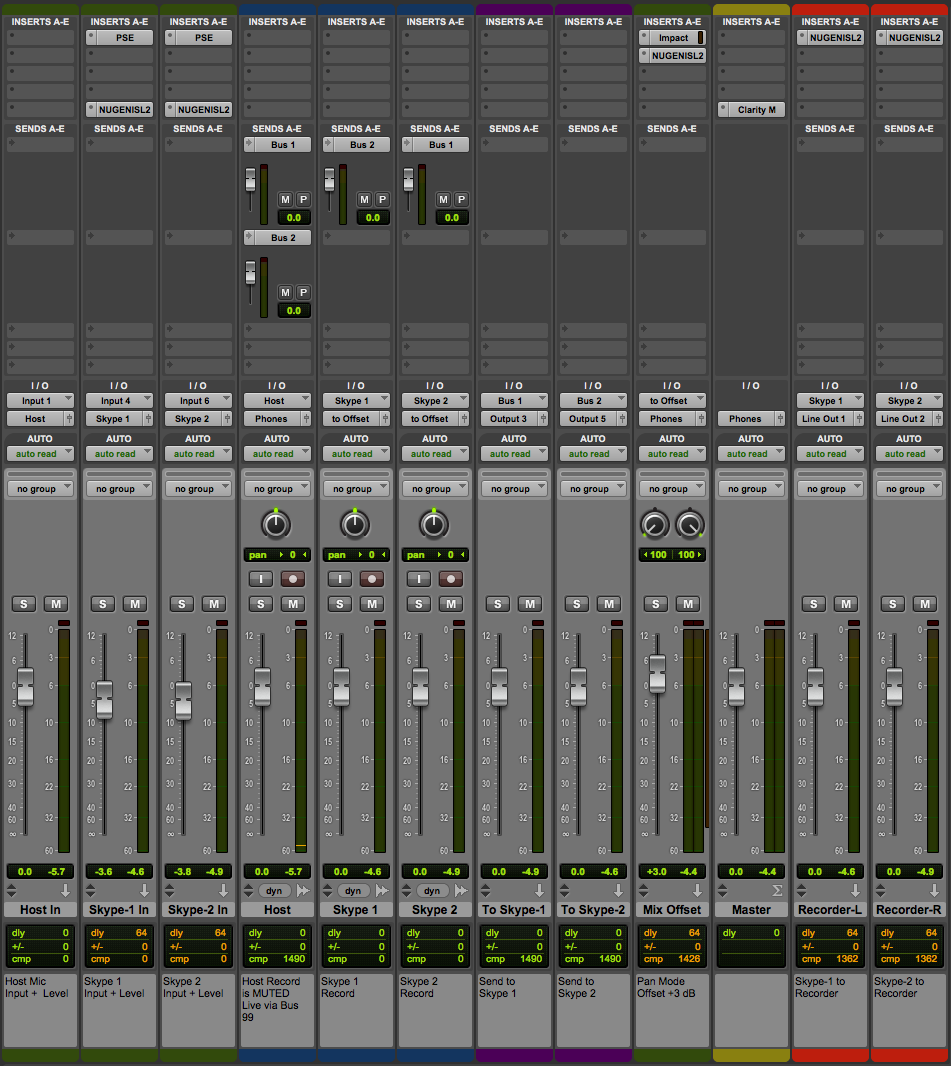
The Chanel Strip configuration will be described in sequential order. Please note the described Session configuration is more complex than what is required.
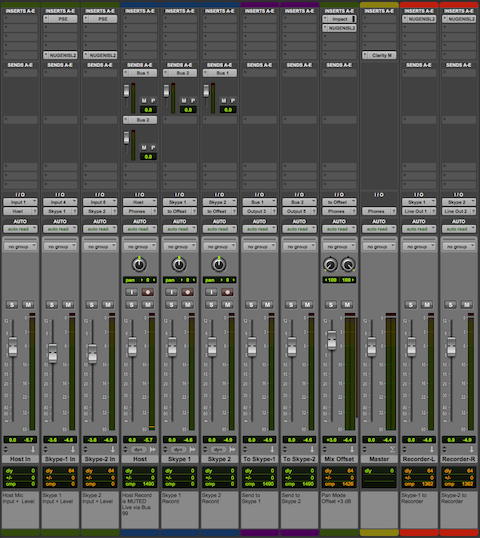
The first 3 Channel Strips (Green) are mono Auxiliary Inputs. Their assigned Inputs are the Host Mic, Skype Client 1, and Skype Client 2. Notice how the assigned inputs match the input configuration as displayed in the I/O Matrix table diagram (1 + 4 + 6).
The Faders on these Channel Strips function as input level controllers for each source input before the signals reach the pre-fader recording tracks.
Two audio plugins are inserted on each Skype Client input Channel Strip (Downward Expander and Limiter). The Expanders will transparently attenuate the inactive input. The Limiters will function as a safeguard thus preventing unexpected signal level overload. Plenty of headroom is maintained. In essence the Limiters will rarely engage.
Tracking Configuration
The outputs of the source input Channel Strips are routed (via virtual Buses) to the inputs of 3 standard mono Audio Channel Strips (Blue). When armed, they will record the source inputs discretely.
Sends
The Host Channel contains 2 active Sends passing audio to Bus 1 and Bus 2.
The Skype 1 Channel contains 1 active Send passing audio to Bus 2.
The Skype 2 Channel contains 1 active Send passing audio to Bus 1.
Returns
2 additional Auxiliary Input Channel Strips (Purple) receive signal from Send Buses 1 + 2.
Configuration as follows:
• The To Skype-1 input is set to Bus 1. This Bus includes the tapped Host audio and the tapped Skype 2 client audio. It’s output is set to Output 3.
• The To Skype-2 input is set to Bus 2. This Bus includes the tapped Host audio and the tapped Skype 1 client audio. It’s output is set to Output 5.
Notice how the assigned outputs (3 + 5) match the output configuration displayed in the I/O Matrix table diagram.
At this point we’ve created a dual Mix-Minus in the mixer…
* * *
Monitoring and Pan Offset
Pro Tools attenuates center-panned mono tracks according to a user defined Pan Depth setting. My setting is always -3 dB.
Here’s how I reconstitute the attenuation:
Notice the outputs of the Skype 1 and Skype 2 audio tracks are routed to a stereo Bus labeled to Offset. An Auxiliary Input Channel Strip (Green, labeled Mix Offset) receives the audio from the to Offset virtual Bus. I use the Channel Strip fader to add +3 dB of static gain to reconstitute the previously applied attenuation on the passing signal.
The Mix Offset Channel Strip’s output is set to Phones. This signal path represents the Interface Headphone outputs (13+14). They are referenced in the I/O Matrix table diagram.
The Master Fader’s (Yellow) output is also set to Phones. This configuration allows the engineer to monitor the Skype participants via headphones connected to the Motu Interface.
Notice the output for the Host Audio Track is set to Mute Bus. This is an unassigned virtual Bus. The Host Mic input is directly monitored (also via headphones) through the Motu Interface. Setting the Host channel output to the Session’s Phones output Bus will blend the hardware monitored mic signal with the slightly latent Session output. Using the unassigned Bus solves this. Of course in Post the hardware monitored signal will be absent. In this case the output must be reassigned to the Phones output Bus.
Skype
In preparation for recording, two independent instances of Skype (using unique accounts) must be launched on the Host System.
My Preferred method:
1) Launch Skype as normal and login to your primary account.
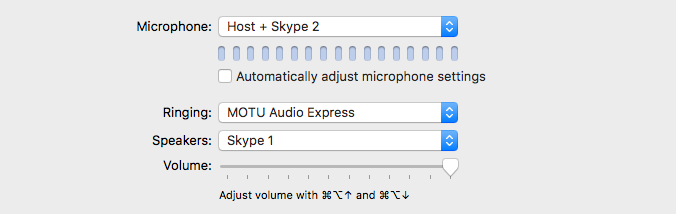
2) In the Skype Preferences/Audio/Video – define the Microphone (input) and Speakers (output) as displayed:
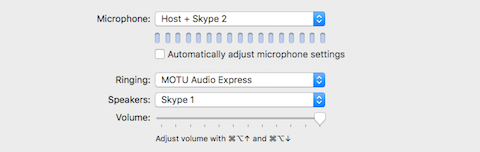
Notice we revert back to independent Virtual Devices created in Loopback for the configuration of this Skype instance. The Host + Skype 2 device is essentially output 3 in the configured DAW. It passes the Host + Skype Client 2 audio to this running instance of Skype.
[Speakers: Skype 1] is mapped to input 4, previously assigned in the DAW’s configured Session.
3) To launch the second instance of Skype – run the OSX Terminal application and execute the following command:
open -na /Applications/Skype.app –args -DataPath /Users/$(whoami)/Library/Application\ Support/Skype2
(I created an executable Shell Script that runs the displayed command. Once created, simply double click it’s icon to launch Skype).
A second instance of Skype will launch and prompt you for credentials. Login using your secondary Skype account.
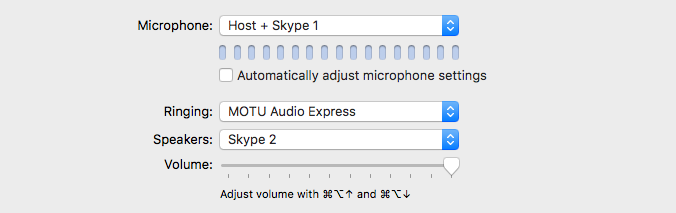
4) In the Skype Preferences for this instance – define the Microphone (input) and Speakers (output) as displayed:
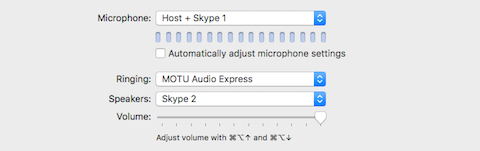
Once again we revert back to independent Virtual Devices created in Loopback for the configuration of this Skype instance. The Host + Skype 1 device is essentially output 5 in the configured DAW. It passes the Host + Skype Client 1 audio to this running instance of Skype.
[Speakers: Skype 2] is mapped to input 6, previously assigned in the DAW’s configured Session.
Recording in the Box
After launching and configuring the Skype instance(s), arm the DAW’s Host, Skype 1, and Skype 2 audio tracks for recording. Connect with the independent Skype participants. Both participants will be able to converse with each other + the Host. Recording the Session will supply discrete audio files for each participant on their respective tracks.
External Recording
In the I/O Matrix diagram you will notice the availability of two sets of stereo outputs (9+10 , 11+12). They represent the Line Outputs and the S/PDIF output on the Motu Interface. Remember the Interface is a Subdevice within the defined Aggregate Device. As a result the noted inputs and outputs are available within the DAW Session for patching.
Also notice the last two Channel Strips (Red) displayed in the Session mixer. They are Auxiliary Input Channel Strips. Their inputs are assigned to the Skype 1 and Skype 2 output Buses. Each Channel Strip output is mapped to corresponding Motu Interface Line Outputs and finally patched to the L+R inputs of an external solid state stereo recorder.
In this particular example only the Skype Participants will be recorded externally. My intension is to engineer Sessions containing two remote clients. In this case it’s a viable solution for out of the box Session recording.
Inserts
You will notice a few additional Audio Plugins inserted on various Channel Strips. A Mix Bus Compressor and a Limiter are inserted on the Mix Offset Channel Strip.
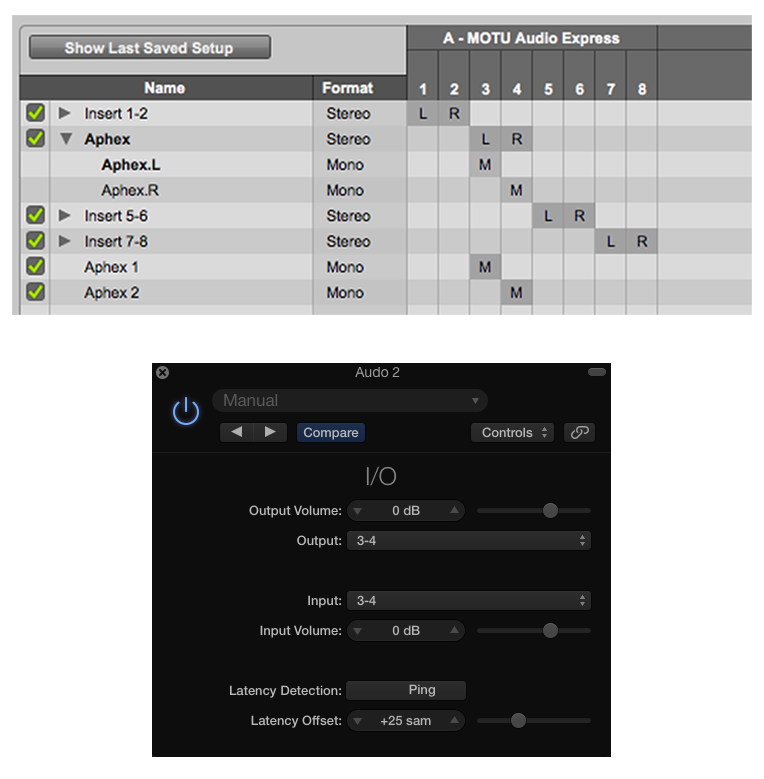
The Inserts located on the Master Fader are post fader. Here I’ve inserted the Clarity M routing plugin. This passes the signal to an external (hardware) Loudness Meter via USB.
Finally I’ve inserted Limiters on each of the external recorder Buses. Again they are set to maintain maximum headroom, and only exist to prevent unexpected signal level overload before the audio reaches the recorder.
Of course Plugin implementation in general will be subjective.
Notes
The complexity of the Session can be customized or even minimized to suit your needs. Basic requirements include a properly configured Aggregate I/O, 3 audio tracks capable of recording, 2 Aux Sends, and a Master Fader. The dual Skype requirement is necessary and straightforward.
It is possible to add support for additional running Skype clients. This will require additional (mono) Loopback Pass-Thru Virtual Devices, and further customization of the Aggregate Audio Device + DAW Session.
I defined custom Incoming Connection Ports for each Skype Instance. This option is available in Skype Preferences/Advanced. Port Mapping was managed in my Router’s configuration utility.
I closely monitored System Resources throughout testing and checked for potential deficiencies. Pro Tools performed well with no issues. Each running instance of Skype displayed less than 14% CPU usage. Memory consumption was equally low. Note my Quad 2.8 GHz Mac Pro has 32 gigs of RAM and four dedicated media drives.
Undoubtedly someone will state this implementation is “much too complicated for the common Podcaster,” or even “Broadcaster.” With respect I’m not necessarily targeting novices. Regardless, you will most certainly require skills and experience in DAW and I/O signal routing.
Please note a Mix-Minus feed in general is not some sort of revelation. It’s pretty basic stuff. You’ll need a full understanding of it as well.
If you have questions I am happy to help. If you would like to participate in a test, ping me. If you are overwhelmed please revert to a service such as Zencastr.
-paul.








_large.png)